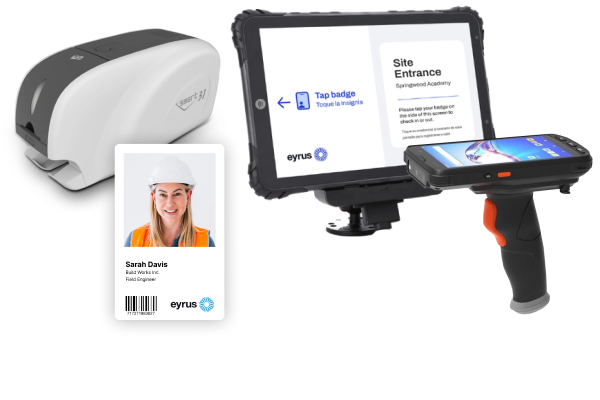
A construction site badging system registers every worker, issues a photo ID badge tied to their profile, and records each scan at the gate. This guide covers how badging works on a jobsite, which badge types to use where, what the records are used for, the compliance rules that touch badging, and what to look for in a system. It's written for general contractors, superintendents, safety managers and project managers.
Short answer: A construction site badging system registers every worker before they reach the gate, prints a photo ID badge tied to their profile, and records each scan at turnstiles, doors, kiosks or readers. The badge proves who is on site, whether their orientation and certifications are current, and how long they worked — data that feeds headcounts, safety reports and payroll.
In this guide
A construction site badging system is the software and hardware that turns a worker's registration into a credential the site can check. It combines a registration record (who the worker is, who they work for and what training they have), a printed badge, and the readers that scan it at turnstiles, gates, doors and kiosks.
The difference from a printed ID card is what happens at the gate. A printed ID card shows who a worker says they are; a badging system knows whether they are cleared to be on site right now. When an orientation is missing or a certification expires, the badge stops working, instead of the problem turning up in an audit weeks later.
Badging is the identity layer. Access control is the permissions layer: it decides where and when each badge works, through barriers and rules by zone, schedule, trade or certification. Most sites need both, which is why they are usually bought as one system. For the gate and zone side, see our guide to construction site access control.
Workers register on their phone before or during safety orientation, an admin reviews each profile and prints a badge from the project's template, and the worker leaves orientation with a credential that is already active. From then on, every scan at a turnstile, door, gate, kiosk or reader adds a time-stamped event to that worker's record.
What goes on a construction worker badge. Most sites use a credit-card-size (CR80) PVC card with the worker's photo, name, company and trade. Many add a color or template per access level, a separate visitor template, and a printed barcode as a backup to the chip. Keep phone numbers, addresses and certification details in the system, not on the card.
How long it takes. Once a worker is registered and onboarded, printing and assigning the badge in Eyrus takes under a minute. Fold registration into safety orientation and the badge becomes proof the worker finished it: no badge, no entry.
Most construction sites use NFC badges at entry points and Bluetooth (BLE) badges for presence inside the site, often combined in one card. NFC records who came through a gate, by tap. BLE records who is in a zone, without a tap. QR codes and printed photo IDs cover visitors and backups, while face or palm readers remove the badge entirely but bring biometric privacy law with them.
| Credential | How it reads | Best jobsite use | Limitation |
|---|---|---|---|
| Printed photo ID | A guard looks at it | Very small sites; a visual layer on any badge | Records nothing; easy to fake or lend |
| Barcode or QR code | Camera, handheld scanner or phone | Visitors, deliveries, a printed backup to the chip | Can be photocopied or screenshotted and shared |
| NFC (13.56 MHz) | Tap within 1–5 cm | Turnstiles, doors, gate arms, kiosks, handheld scanners | Needs a deliberate tap at every point |
| UHF RFID | Read at a distance, no tap | Vehicle gates and lanes | Not a one-person-at-a-time check |
| Bluetooth (BLE) | Readers detect the badge's signal in a zone | Time on site, floor or zone presence, muster roll call | Battery-powered; shows presence, not a gate decision |
| NFC + BLE combo | Both, from one card | Sites that want gate control and zone data | Costs more than a passive NFC card |
| Face or palm (biometric) | Reader matches the person, no badge | Ending badge sharing at the main entrance | Consent, retention and state privacy law |
An NFC tap answers who came through the gate. A Bluetooth badge answers who is on level 4 right now. Sites that need both use a combination badge, so one worker record holds gate events and zone presence.
Yes, with consent and a retention policy, but the rules depend on the state. Face and palm readers end badge sharing, and in Illinois they fall under the Biometric Information Privacy Act (BIPA), which requires written notice and a written release before biometric data is collected. BIPA sets statutory damages of $1,000 per negligent violation and $5,000 per reckless or intentional one.
An amendment signed August 2, 2024 counts repeated scans of the same person by the same method as one violation rather than one per scan, and lets consent be captured by electronic signature. In 2026 the Seventh Circuit held that the amendment applies retroactively. Texas and Washington have their own biometric privacy statutes.
Practical steps for any site using biometrics: collect signed consent at registration, publish a retention and destruction schedule, offer a badge alternative for workers who decline, and check the applicable labor agreement. This is general information, not legal advice; review your program with counsel.
Every scan ties a verified worker to a time and a place. That one record answers the questions a GC gets asked daily: how many people are on site, whether each one is cleared to be there, how many hours each subcontractor actually worked, and who is still inside during an evacuation.
| Question | What the badge record shows | Who asks |
|---|---|---|
| How many people are on site? | Live headcount by company, trade and zone | Superintendent, owner |
| Is this worker cleared to be here? | Orientation, certifications and safety cards, checked at the gate | Safety manager |
| Did the sub work the hours they billed? | First-in, last-out and total hours per worker | Project manager, owner, labor compliance |
| Who is still inside? | Workers seen on site who have not reached the muster point | Safety manager, first responders |
| Who can enter this room? | Access by zone, schedule, company, trade or certification | Site admin, owner's security |
Emergency muster. Bluetooth readers at the muster point can mark workers present without a tap, and a roster of everyone seen on site shows who is unaccounted for. The evacuation roster is only as good as the last scan, which is why it has to come from the badge, not the sign-in sheet.
No federal OSHA standard requires ID badges on construction sites. Badges matter for OSHA because they document who was on site and what training they had. Under OSHA's multi-employer citation policy, a GC can be cited for hazards affecting its subcontractors' workers, so a verifiable roster is part of the GC's defense.
On New York City sites that require a Site Safety Plan and a designated construction superintendent, site safety coordinator or site safety manager, Local Law 196 of 2017 requires workers to show a Site Safety Training (SST) card proving at least 40 hours of training; supervisors need 62 hours. Cards are valid for five years. After a card expires there is a one-year renewal grace period, but an expired card can't be used to work on a jobsite during it. Local Law 10 of 2026, in effect since May 3, 2026, added mental health, suicide prevention and substance misuse topics to SST.
A badging system that stores each worker's SST card number and expiry date can block an expired card at the gate instead of finding it in an audit. An SST card in a wallet proves training happened once; an SST card checked at the turnstile proves it is still valid today.
The badging system should flag a certification before it lapses and act when it does: alert the safety team, then restrict access to any zone that requires that certification or training level. Re-entry follows the renewal, not a phone call to the gate.
Badge records don't replace certified payroll, but they let a GC check it. On Davis-Bacon and prevailing wage work, contractors submit certified payrolls weekly; badge-in and badge-out times show who was actually on site and for how long, so a GC can catch a mismatch before signing off.
Judge a badging system by what happens after the badge prints: whether it blocks a worker whose certification lapsed, expires badges nobody is using, stops one badge from admitting two people, and turns scans into hours a GC can check against subcontractor payroll.
Registration and issuance
Credentials and hardware
Control and security
Records and integrations
Privacy
Make sharing visible, then make it impossible where it matters. Full-height turnstiles admit one person per read; a reader that shows the badge photo lets a guard spot a mismatch; misuse alerts catch one badge seen in two places; and face or palm readers at the main entrance remove the badge altogether.
Eyrus links registration, badge printing and access control in one record. Workers register by QR code during orientation, badges print on site from the project's own templates, and every NFC tap or Bluetooth read lands on the same profile that feeds headcounts, timesheets and certification alerts.
| Stage | What Eyrus does |
|---|---|
| Register | Project QR code or link, the Eyrus Workforce app, single entry or bulk import. A worker arriving with an Eyrus badge from another project keeps that badge and photo. |
| Design | A badge designer with fixed elements (labels, logos, shapes) and dynamic worker fields (name, photo, company, trade), with separate templates for access levels and visitors. |
| An admin badge printer or a worker self-badge kiosk. Once a worker is registered and onboarded, printing and assigning the badge takes under a minute. | |
| Credential | The Eyrus BLE/NFC combo badge: an NFC chip read at 1–5 cm on one side, BLE 5.0 on the other with a battery rated for 3 years, IP67, rated for −20°C to 60°C. It works with NFC readers, kiosks, handheld scanners and the Eyrus Visibility app. Face and palm readers also read NFC badges. |
| Control | Access rules by zone, schedule, company, trade, title, or certification and training level. Badges can be turned on or off on one site or across a portfolio. |
| Retire | End-dating keeps hours on record; bulk deactivation; automatic deactivation after 30, 60, 90 or a custom number of days unseen, with company and group exemptions. |
| Staff | Eyrus Field Services can run registration, badging, greeting, badge scanning and visitor management on site. |
| Connect | Procore, Autodesk Construction Cloud and Oracle Primavera, plus HammerTech and Breadcrumb for safety management. |
What is the difference between badging and access control? Badging establishes who a worker is and issues the credential: registration, verification, printing and the badge record. Access control decides where and when that credential works, through turnstiles, doors, gates and rules by zone, schedule, trade or certification. A badge without access control is an ID card; access control without badging has no verified identity behind it.
How long does it take to badge a construction worker? Once a worker is registered and onboarded, printing and assigning the badge takes under a minute in Eyrus. Workers register on their phone during safety orientation, so the badge can be waiting when orientation ends. The slow version is a clipboard and one printer at the gate on day one.
What information should be printed on a construction worker badge? Print what a guard needs to verify at a glance: photo, name, company and trade, plus a color or template for access level. Many sites add a barcode as a backup to the chip. Keep phone numbers, addresses and certification details in the system, not on the card, where a lost badge would expose them.
Can one badge work across multiple projects? It depends on the system. In Eyrus, a worker who arrives with an Eyrus badge from another project can be registered to the new one with the same badge and photo, adding only project-specific details. Access stays project-specific: the badge works only where that project's rules allow.
How should visitors and delivery drivers be badged? Give them a different credential from workers: a visually distinct, short-lived visitor badge, or a QR code or temporary badge issued by a guard with a handheld scanner. Log their entry and exit the same way, so they appear in headcounts and evacuation rosters, and set an escort rule for active work areas.
What happens when a worker loses their badge? End-date the lost badge, print a replacement and assign it to the same worker profile. The old badge stops working at every reader, and the worker's hours continue in one record. Don't delete the old assignment: in most systems, Eyrus included, deleting it erases the hours recorded against it.
Do Bluetooth badges track where workers go? Only on site. A BLE badge is detected by readers installed on the project, so it shows which zone a worker is in during the job, not where they go after work; it has no GPS. Sites use the data for headcounts, time on site and evacuation rosters, and should tell workers what is collected at registration.
How much does a construction badging system cost? Budget for four parts: the software subscription; badge stock, where passive NFC cards cost less than battery-powered Bluetooth badges; a badge printer or self-service kiosk; and the readers or turnstiles the badges open. Staffing registration on day one is the cost most often missed.
Can owners see badging data across their projects? Yes, when the system separates identities from totals. Owners usually need headcounts, hours by trade and subcontractor, and compliance status across a portfolio, not individual worker profiles. In Eyrus, the GC sees worker profiles while the owner sees anonymized portfolio data.
Can workers use their phone as a badge? Yes, where readers support mobile credentials, but most sites still issue a physical badge. A card works when a phone is dead, left in the truck or buried under PPE, and it doubles as visible ID. Mobile credentials suit office staff and visitors; physical NFC or BLE badges suit the field workforce.
The right badging setup depends on your site's entrances, phases and workforce size. Eyrus will map registration, badge printing, readers and turnstiles to your logistics plan, and show how badge data flows into headcounts, timesheets and compliance reports. Plan badging for my site →
Related guides:Construction site access control · Construction turnstiles · Construction onboarding software · Construction workforce management software


